
Think about the last time you clicked "Log in with Google" instead of creating a new password, or let a scheduling app see your calendar without handing over your email password. Both of those moments run on OAuth. It is the protocol that lets one application access specific pieces of your data on another application.
What is OAuth?
Before going further, it helps to separate two things people often mix up. Authentication confirms who you are. Authorization decides what you are allowed to do, or in this case, what a third-party app is allowed to access on your behalf. OAuth handles the second one. It does not log you in by itself, it grants limited, scoped access to a resource after you have already logged in somewhere else. That distinction matters more than it sounds, and it is why OAuth is so often paired with a separate identity layer, which we will get to below.
Definition of OAuth
OAuth, short for Open Authorization, is a token-based standard for granting one application limited access to a user's data on another application, without that first application ever seeing the user's password. Instead of a password, OAuth hands out an access token, a short string that proves the holder has permission to do a specific, limited set of things. Google, Facebook, Microsoft, GitHub and nearly every major platform run some version of OAuth to let third-party apps request access to a user's account safely.
Access is never all-or-nothing. Every OAuth request specifies scopes, the exact permissions being asked for, such as read-only access to a calendar or the ability to post on someone's behalf. A well-built app requests only the scopes it actually needs, and a careful user should always check what scopes an app is asking for before approving.
Why OAuth was introduced?
OAuth was introduced because there was a need for easy sign-in that could be used as a common sign-in option for lots of apps. All the information required to create a user account is usually present in social media accounts of users so OAuth was developed with the aim to share this information with apps after getting permissions from the user.
There was a second, bigger reason behind OAuth's design: password sharing is dangerous. Before OAuth became standard, some apps genuinely asked users to type their Facebook or Google password directly into a third-party form. That approach gave the third-party app permanent, unrestricted access to the account, with no way to revoke just that one connection without changing the password everywhere.
OAuth solved this by issuing a token scoped to specific permissions, one that can be revoked at any time from the account settings of the original platform, without touching the user's password at all.
When OAuth was launched?
In 73rd Internet Engineering Task Force (IETF) meeting in Minneapolis in November 2008, OAuth was introduced to discuss further standardization work to be done. The event was well attended and addressed wide support inside IETF and outsider’s chartering groups. After going through a long development cycle, the OAuth 2.0 Framework and Bearer Token Usage were finally published in October 2012.
Although OAuth 2.0 has some limitations like it is not backwards compatible with OAuth 1.0 yet it is being used by Google, Facebook, Twitter, Microsoft’s Azure active directory and many others. OAuth 2.0 provides authorization flows for web apps, desktop apps, mobile phones, and smart devices.
OAuth 2.0 vs OAuth 2.1: What Actually Changed
OAuth 2.0, published in 2012, is still the version most people mean when they say "OAuth." But by 2026, OAuth 2.1 has become the practical standard almost everyone builds against, even though it is technically a consolidation of OAuth 2.0 plus a set of security fixes the industry had already agreed were mandatory.
The most important change is PKCE, short for Proof Key for Code Exchange. Under the original OAuth 2.0 spec, PKCE was optional and mainly recommended for mobile and single-page apps that could not safely store a client secret. OAuth 2.1 makes PKCE mandatory for every client, public or confidential. Here is why that matters: in the older flow, if an attacker intercepted the authorization code during the redirect step, they could exchange it for an access token themselves. PKCE closes that gap.
The client generates a random secret value before starting the flow, sends a hashed version of it with the initial request, and then has to present the original value when exchanging the authorization code for a token. An attacker holding only the intercepted code cannot complete that final step without the original secret, which never left the client.
OAuth 2.1 also quietly retires a few older, weaker flows, including the implicit grant and the resource owner password credentials grant, both of which had known security weaknesses. If you are building anything new in 2026, build it against OAuth 2.1 with PKCE from the start, even if a library still labels itself OAuth 2.0. If your team needs help getting this right, our custom software development team builds secure authorization into applications from day one.
How does OAuth work?
OAuth uses secret keys and access tokens that are uniquely assigned to users for using OAuth for an app developer need to register software applications with the social media platform or the tech giant whose database they want to access. The developer needs to go on developers’ section of the social media platform and register the web app with URL on which it is deployed, then he/she will get the secret keys and access tokens.

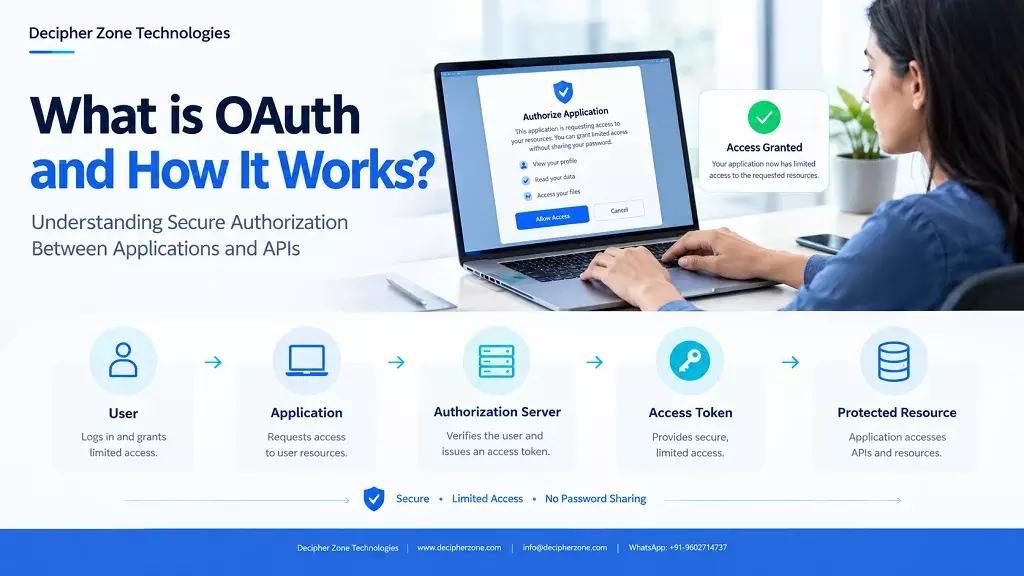
OAuth workflow has the following 5 itineraries which are used to authenticate users:
User
A visitor who wants easy access over apps without the hassle of creating a new account.
Browser
A web browser is a simple tool which is being used by the user to access the software application, here that is called client.
Client
The client is a software application which can be a web app, desktop app, mobile phone app or a smart device.
Authorization Server
Authorization Server authorizes user and client (software application) from OAuth API provider.
Resource Server
When user and client (software application) are authenticated then the user can request for restricted resources through a client (software application) from OAuth API provider.
Workflow of OAuth
-
User visits client (software application) and requests to log in through OAuth of let’s say Facebook.
-
Client (software application) requests a browser for access.
-
Browser redirects access to Facebook’s authorization server.
-
Authorization server asks the user to authenticate himself/herself.
-
The user enters his/her Facebook’s login credentials and authorization server matches the credentials and on the successful match, it authenticates the user.
-
The authorization server then asks the user to authorize the client (software application).
-
User authorizes client (software application) to get data from Facebook.
-
Before this whole flow even starts, the client generates a random value called a code verifier, and sends a hashed version of it, called the code challenge, along with the very first request in step 1. This is the PKCE step that OAuth 2.1 requires.
-
The authorization server redirects the user on the browser to the client (software application) with the authorization code.
-
The client (software application) sends the authorization code back to the authorization server, along with the original code verifier from step 8, to request an access token and a refresh token. The authorization server checks that the code verifier matches the code challenge it received earlier. If it does not match, the request is rejected, even if the authorization code itself is valid.
-
The client (software application) then goes to the resource server and provides access tokens to get restricted resources from Facebook.
-
Now the user is successfully registered with the app and is logged in to the client (software application).
In how many ways OAuth can be implemented?
OAuth can implement on the front end as well as the backend of software applications so where to implement it is clearly dependent on the scope of software application. In a modern way, JavaScript on the front end is used more for OAuth authentication because there it is easy to manage restrictions on user’s access and the response time is low. Whether you need this on the front end, back end, or both, our full stack development team can implement it correctly on both sides.
OAuth and AI Agents: The 2026 Use Case
The newest and fastest-growing use of OAuth has nothing to do with a human clicking "log in." AI agents, the kind that can browse a calendar, send an email, or pull data from a tool on a user's behalf, need their own way to prove they have permission to act, without holding onto a user's password or a long-lived API key.
The Model Context Protocol, or MCP, is one of the clearest examples of this in production. When an AI agent needs to call a protected MCP server, the server treats itself as an OAuth 2.1 resource server, and the agent goes through the same authorization code flow with PKCE described above, just with the agent acting as the client instead of a traditional web app.
The user still authenticates and consents once, and the agent receives a short-lived, scoped token rather than standing credentials. This keeps a clear, revocable trail of exactly what the agent was authorized to do and when, which matters a lot once an autonomous system is making decisions and taking actions without a person approving each individual step.
This is a genuinely new direction for a protocol that started out solving a much simpler problem, letting one website borrow a slice of your data from another. The core mechanics have not changed much. What has changed is who, or what, is on the other end of the token. If you are building an AI agent that needs to act on a user's behalf, our generative AI development team can help you design that authorization flow correctly from the start.
Frequently Asked Questions
Is OAuth the same as OpenID Connect?
No, though they are often used together. OAuth handles authorization, deciding what an app is allowed to access. OpenID Connect (OIDC) is a thin identity layer built on top of OAuth that handles authentication, confirming who the user actually is. When you see "Sign in with Google," that login itself is usually OIDC, while any data access the app requests afterward runs on OAuth.
Why is PKCE required now if it wasn't before?
PKCE closes a real vulnerability in the original OAuth 2.0 authorization code flow, where an intercepted authorization code alone was enough for an attacker to obtain an access token. OAuth 2.1 made PKCE mandatory for all clients specifically because that gap had been exploited in the wild, not just theorized about.
Can OAuth tokens be revoked?
Yes. Because OAuth grants scoped, token-based access rather than sharing a password, a user can revoke a specific app's access at any time from their account settings on the platform that issued the token, without needing to change their password or affect any other connected app.
Does an AI agent need its own OAuth setup, or can it reuse a user's existing login session?
It needs its own setup. Reusing a human's session for an autonomous agent breaks the ability to track, scope, or revoke what that agent specifically did, separately from the user's own actions. The emerging standard in 2026 treats AI agents as their own class of OAuth client, going through the same authorization code flow with PKCE, so every action the agent takes is tied to a short-lived, scoped, and auditable token.