
Mobile app development has never been more competitive or more complex. The global mobile app market is projected to reach $391 billion in revenue by 2026, with over 250 billion app downloads annually and the average person spending more than four hours per day on mobile devices. The opportunity is massive. But so is the failure rate.
Analysis of over 50 small business projects found that 68% faced major mobile app development challenges that delayed launch timelines, and projects typically ran 30% over budget. Those are not outlier numbers. They describe the default outcome when development teams underestimate what they are building.
This guide covers 15 real challenges in mobile app development in 2026, each with its root cause, its practical impact on projects, and the specific solutions that actually work. Not generic advice. The specific decisions that separate apps that ship well from apps that ship late, over budget, or not at all.
Read: Mobile App Development Process | Emerging Trends in Mobile App Development
Key Phases of Mobile App Development in 2026
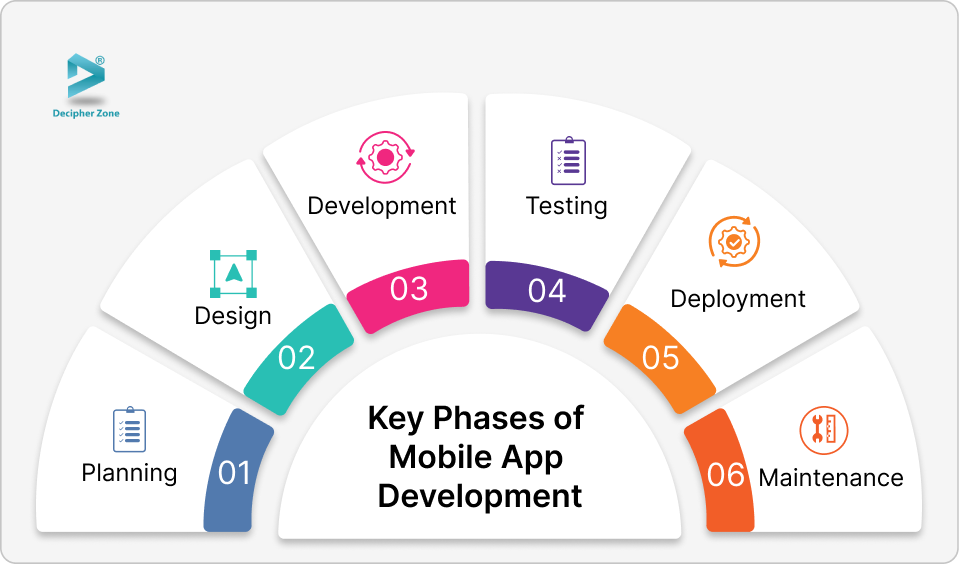
1. Planning
Define the app's purpose, target audience, and key functions. Market research and competitor analysis at this stage determine whether the app has a reason to exist before a single line of code is written.
2. Design
Designers and developers collaborate to create a user-friendly interface and layout. Wireframing and prototyping reveal flow problems before they become expensive code problems.
3. Development
The actual build phase, using programming languages such as Swift, Kotlin, or JavaScript depending on platform and framework choice. Both frontend and backend systems are built and connected.
4. Testing
Thorough testing identifies bugs, usability gaps, and performance issues across different devices and operating system versions.
5. Deployment
Submission to the iOS App Store and Google Play, each with its own review guidelines, compliance requirements, and approval timelines that can delay launch measurably.
6. Maintenance
Post-launch updates, security patches, OS compatibility fixes, and feature improvements keep the app functional and competitive as the technology landscape evolves.
Platform and Tech Stack Selection: The First Decision That Shapes Everything
Before covering the 15 challenges, the most consequential decision in mobile app development must be addressed: which platform and development approach to use. This choice affects every challenge below.
| Approach | Best For | Performance | Cost | Time to Market | Key Trade-off |
|---|---|---|---|---|---|
| Native (Swift for iOS, Kotlin for Android) | Performance-intensive apps, AR, hardware integration | Excellent | High (two codebases) | Slower | Best performance, highest cost and development time |
| Cross-Platform (React Native, Flutter) | Budget-constrained, standard functionality, faster launch | Good to Very Good | Medium (one codebase) | Faster | Shared codebase has limits for hardware-dependent features |
| Low-Code (OutSystems, Appgyver) | Simple internal tools, rapid MVP validation | Fair | Low (initially) | Fastest | Scalability ceiling hit quickly, and migration off the platform is costly |
| Progressive Web App (PWA) | Content-heavy apps, offline-first, cross-device access | Good | Low | Fast | Limited access to device hardware and no app store presence |
Read: Cross-Platform App Development Guide | React Native Guide | Flutter App Development
15 Key Challenges in Mobile App Development in 2026
Challenge 1: Understanding Market and User Needs
The most common reason apps fail is not technical. It is building something users do not actually want, or building the right thing for the wrong audience. Developers often jump to solutions before the problem is fully understood.
Root Cause
Assumptions replace research. Teams build based on what they think users want rather than evidence from actual target users. Competitor analysis is skipped or superficial.
Real Impact
An app built without validated user research launches to low download rates, high uninstall rates within the first 30 days, and negative App Store reviews citing missing or irrelevant features.
Practical Solution
- Conduct at least 8 to 12 user interviews with your target demographic before wireframing begins
- Run a competitor audit: identify the top 3 apps in your niche, note their one-star reviews on the App Store and Play Store, and build features that directly address those complaints
- Validate your core value proposition with a no-code prototype or landing page before committing to full development budgets
Challenge 2: Choosing the Right Development Platform and Tech Stack
Picking the wrong platform or framework is a decision teams live with for years. The choice affects performance, hiring difficulty, long-term maintenance cost, and the technical ceiling of what the app can do.
Root Cause
Platform decisions are made based on what the team already knows rather than what the app actually requires. Budget pressure pushes teams toward cross-platform when the app's feature set requires native performance.
Real Impact
An app built with the wrong framework hits performance walls when adding features like real-time video processing, AR integration, or complex animations. Migrating frameworks mid-project typically costs more than building native from the start.
Practical Solution
- Map every planned feature against the platform's capability table before choosing a framework
- Use Flutter or React Native for standard functionality apps with budget constraints and faster timelines
- Choose native Swift or Kotlin when your app requires deep hardware integration, AR features, or performance levels cross-platform frameworks cannot reliably deliver
- For enterprise apps, factor in the internal team's existing expertise: a team with strong JavaScript skills will move faster in React Native than in Flutter
Challenge 3: Budget and Timeline Overruns
Cost overruns are the norm, not the exception, in mobile app development. This is not because development is inherently unpredictable. It is because initial estimates are built on incomplete scope definitions.
Root Cause
Estimates are given before scope is locked. Clients add features mid-sprint. Integrations with third-party systems take longer than anticipated. QA reveals problems late in the cycle that require rework.
Real Impact
Research on small business mobile projects found the average cost overrun reaches 30% of the original estimate, with timeline delays averaging 6 to 10 weeks beyond original projections.
| Cost Overrun Pattern | How Often It Occurs | Prevention |
|---|---|---|
| Scope creep (features added mid-sprint) | Most projects | Formal change request process: every new feature assessed against timeline and budget before acceptance |
| Third-party API integration delays | Very common | Budget 40 to 60% more time than estimated for each API integration, especially payment gateways and maps |
| Late QA discovery requiring rework | Common | Shift QA left: start testing in sprint 1, not after all features are built |
| App store rejection requiring code changes | Frequent for first-time submitters | Review App Store and Play Store guidelines before development begins, not before submission |
| Performance optimization discovered late | Common | Include performance testing with each sprint, not as a final phase |
Practical Solution
- Lock scope before any development begins. Every feature change after sprint one is a change request with a documented cost and timeline impact
- Build a 20 to 25% budget contingency into every mobile development project from day one
- Use a minimum viable product (MVP) approach: launch the core feature set, validate with real users, then invest in expansion

Challenge 4: Device Fragmentation and Cross-Platform Compatibility
This is one of the most underestimated technical challenges in mobile development, particularly for Android.
Root Cause
Android alone has over 24,000 distinct device models from dozens of manufacturers, with screen sizes ranging from compact phones to foldables. iOS is more controlled but still runs across multiple generations of hardware with different performance profiles, screen sizes, and OS versions.
Real Impact
An app that works perfectly on a Samsung Galaxy S24 may crash on a mid-range Motorola with a different Android skin and different available memory. A layout that looks clean on an iPhone 16 Pro breaks on an iPhone SE. These issues are only discovered when users report them, typically in App Store reviews.
| Fragmentation Dimension | Scale of the Problem | Testing Approach |
|---|---|---|
| Android device models | 24,000+ distinct models | Use Firebase Test Lab to run automated tests on top 10 devices by your market region |
| Android OS versions in active use | Android 10 through 15 all still active | Support minimum Android 10, test on Android 10, 12, and 14 as the spread |
| Screen sizes and aspect ratios | From 4-inch to 7-inch and foldables | Constraint-based layouts in Android, Auto Layout in iOS, no hardcoded dimensions |
| RAM and processor performance | From 2GB to 16GB RAM in active devices | Test on mid-range devices (2-year-old $200 Android) as the performance benchmark |
| Manufacturer UI skins (Samsung One UI, MIUI) | Major manufacturers modify Android | Test on stock Android and at least Samsung and Xiaomi/MIUI for coverage |
Practical Solution
- Define your target device matrix before development: the specific device and OS combinations your analytics or market research shows your users have
- Use device cloud testing services (Firebase Test Lab, BrowserStack, LambdaTest) to automate testing across real devices without owning the hardware
- Test on mid-range two-year-old devices as your baseline. If it performs well there, it performs well everywhere
Challenge 5: UI/UX Design Quality

Poor UX is the leading cause of app abandonment. Users do not write negative reviews explaining that the architecture was poorly designed. They write: "this app is confusing" and uninstall it.
Root Cause
UX is treated as a visual exercise rather than a problem-solving discipline. Wireframes are skipped to save budget. User testing happens too late, after significant code has been committed to a flow that users find unintuitive.
Real Impact
An app where users cannot complete the core task within 60 seconds of opening it for the first time will be abandoned. The average user gives an app fewer than two attempts before forming a permanent opinion.
Practical Solution
- Wireframe every user flow before any visual design begins. Test the wireframe with 5 real users: if they cannot complete the primary task without guidance, redesign before coding
- Follow platform-native design patterns (Apple Human Interface Guidelines, Material Design for Android): users already know how these patterns work, and deviating from them increases cognitive load
- Design for thumb reach on one-handed use: most mobile interactions happen with one hand, and primary actions should be in the lower two-thirds of the screen
- Prioritize loading states and empty states: the moment between a user action and the app's response is where trust is built or lost
Read: UI/UX Design Trends | UI/UX Design Services
Challenge 6: App Performance and Speed
Performance is not a feature. It is a baseline expectation. Users abandon apps that take more than 3 seconds to load a core screen. That expectation does not soften as device hardware improves. User patience decreases.
Root Cause
Performance optimization is treated as a final phase rather than a continuous practice. APIs are designed for functionality rather than efficiency. Images are not compressed. Data is not cached. The app is tested on high-end flagship devices that development team members use, not the mid-range devices most real users have.
Real Impact
A 1-second delay in app response time increases user abandonment by 20%. An app that drains battery measurably is uninstalled regardless of its feature quality.
Practical Solution
- Implement lazy loading for content and images: load what the user can see, not what might be needed three screens later
- Cache aggressively: any data that does not change frequently should be cached locally so repeat visits do not require network calls
- Optimize API calls: batch requests where possible, use efficient serialization formats (protobuf over JSON for high-volume data), and minimize the data payload returned by each endpoint
- Run performance profiling with Android Profiler and Xcode Instruments in every sprint, not as a final optimization pass
- Set a hard rule: if it does not perform acceptably on a two-year-old mid-range Android device, it does not ship
Challenge 7: Mobile App Security
Security in mobile apps has escalated from a best practice to a business-critical requirement. The numbers in 2026 are stark.
Root Cause
72% of organizations experienced at least one mobile app security incident in the past year. 81% of developers admit AI-generated code has created fresh security risks. 65% of users have uninstalled apps specifically due to security concerns.
Real Impact
A single data breach in a healthcare app, fintech platform, or enterprise mobile tool can result in regulatory fines under HIPAA or GDPR, reputational damage that users do not forget, and class action liability depending on the data involved.
Practical Solution
- Encrypt everything: Data in transit uses TLS 1.3 minimum. Sensitive data at rest (tokens, credentials, user PII) is encrypted using AES-256 in the device keychain or Android Keystore, never in plain text local storage
- Implement multi-factor authentication: Especially for apps handling financial, health, or personal data. Biometric authentication (Face ID, fingerprint) is now expected by users and straightforward to implement via platform APIs
- Conduct regular penetration testing: At least quarterly for apps in regulated industries. A professional pen test catches vulnerabilities that code review misses
- Apply principle of least privilege: Request only the permissions the app genuinely needs. Excessive permissions requests reduce user trust at install time and increase rejection risk from app store reviewers
- Use AI-generated code with caution: Review AI-generated code specifically for security vulnerabilities before committing to production. AI tools produce functional code that can contain injection vulnerabilities, insecure deserialization, and other subtle security flaws
Read our GDPR and HIPAA compliance guide for mobile apps. For healthcare-specific mobile security, see our AI in healthcare development guide and telemedicine app development overview.
Need a secure mobile app for a regulated industry?
Talk to Decipher Zone's healthcare and fintech development team.
Challenge 8: App Store Compliance and Approval
This challenge is unique to mobile development and has no equivalent in web development. Both Apple and Google maintain strict, evolving review guidelines that can delay or permanently block an app's launch.
Root Cause
Development teams read the app store submission requirements at submission time, not at design time. By then, architecture decisions that violate guidelines have already been built and tested, and changing them requires significant rework.
Real Impact
App Store rejections typically add 5 to 15 business days to the launch timeline for each rejection cycle. Multiple rejections can push a time-sensitive launch past critical business milestones. Google Play rejections can result in app removal from the store post-launch if policy violations are discovered after initial approval.
App Store Compliance Checklist
- Read the Apple App Store Review Guidelines and Google Play Developer Program Policies before finalizing features, not before submission
- Complete iOS privacy labels and Android data safety declarations accurately and comprehensively at the design stage
- Test with TestFlight (iOS) and internal testing tracks (Google Play) for at least one week before production submission
- Ensure every permission prompt includes a clear, honest explanation of why each permission is needed: vague explanations are a primary cause of rejection
- Build 10 to 15 business days into the launch timeline for initial review and potential revision cycles
- Starting September 2026, all apps installed on certified Android devices must be linked to a verified developer accountunder Google's new sideloading policy
Challenge 9: AI Integration Challenges (New in 2026)
Integrating AI into mobile apps is no longer optional for many categories. Users in 2026 expect apps to learn their preferences, personalize content, and anticipate needs. But AI integration introduces a set of challenges that did not exist three years ago.
Root Cause
AI features are added as afterthoughts to apps designed without them in mind. On-device AI models require significant device resources. Cloud-based AI adds latency and cost. Training data quality determines output quality, and most development teams do not have strong ML expertise.
Real Impact
An AI recommendation engine that makes clearly wrong suggestions damages user trust faster than no AI at all. An on-device model that causes battery drain and heating complaints generates uninstalls regardless of the model's accuracy.
Practical Solution
- For most apps, use existing AI APIs (Google Gemini, OpenAI, Claude) rather than training custom models: the cost and time advantage is significant and quality is immediately production-grade
- Use on-device models (Google's Gemini Nano, Apple's Core ML) for privacy-sensitive operations and offline functionality: better privacy, lower latency, no per-call API cost
- Design AI features to degrade gracefully when offline or when the API is unavailable: the app must work without AI, with AI as an enhancement layer
- Set clear expectations about AI behavior in the UI: users who understand what the AI is doing and why are more tolerant of imperfect outputs than users who receive unexplained results
Read: AI-Enabled Software Development | Latest Trends in AI
Challenge 10: Testing and Quality Assurance

Testing mobile apps is fundamentally more complex than testing web applications because of device fragmentation, network variability, hardware sensor integration, and offline mode requirements.
Root Cause
QA is treated as a final gate before launch rather than a continuous process. Testing happens on a small set of available devices. Automated tests cover happy paths but not edge cases. Network condition testing (slow 3G, intermittent WiFi, no connection) is skipped.
Practical Solution
- Combine automated testing (unit tests, integration tests, UI automation with Espresso for Android and XCTest for iOS) with manual testing for complex user journeys
- Test under real-world network conditions: use Charles Proxy or similar tools to simulate slow connections, high latency, and disconnections
- Run automated tests on real device clouds (Firebase Test Lab, BrowserStack) rather than emulators alone: emulators miss hardware-specific issues
- Implement crash reporting from day one of beta testing (Firebase Crashlytics, Sentry): real user crashes provide data that emulator testing never produces
- Test the full uninstall and reinstall cycle: data persistence, onboarding re-entry, and permission re-request flows are commonly broken and rarely tested
Challenge 11: Third-Party API and Service Integration
Most modern mobile apps depend on multiple third-party services: payment processors, mapping, authentication, analytics, cloud storage, and communication APIs. Each dependency is a potential failure point.
Root Cause
API reliability is assumed rather than architected for. When a payment gateway API goes down or changes its interface, the app breaks. Rate limits are not planned for. API versioning deprecations are missed.
Real Impact
In a food delivery app, if the payment gateway API goes down, users cannot complete transactions. If the mapping API changes its pricing structure mid-contract, infrastructure costs spike unexpectedly. If authentication providers change their OAuth flow, users cannot log in.
Practical Solution
- Build a service abstraction layer: all third-party API calls go through a wrapper that can be swapped without touching feature code
- Implement circuit breakers: if a third-party API fails repeatedly, the app falls back to a degraded but functional state rather than crashing completely
- Monitor all critical APIs with uptime alerting: know when your dependencies go down before your users tell you
- Read the deprecation and changelog notices for every API your app depends on as a standing item in sprint planning
Challenge 12: Performance Under Scale
An app that performs well with 100 users often fails with 10,000. Scalability challenges in mobile development are both client-side (the app itself) and server-side (the backend that supports it).
Root Cause
Architecture is designed for current load rather than projected load. Databases are not indexed for production query patterns. APIs are built synchronously when asynchronous patterns would serve better. Push notification systems collapse under load spikes.
Practical Solution
- Design backend architecture for 10x your projected launch day traffic from the start: cloud-native deployment on AWS, Google Cloud, or Azure with auto-scaling configured
- Use database sharding or read replicas for read-heavy operations
- Implement message queues for non-real-time operations: sending emails, processing images, updating analytics should never happen in the main request thread
- Load test before every major launch or feature release using tools like k6 or Locust to simulate realistic concurrent user loads
Read: Cloud Native Architecture Trends | Web Application Architecture Guide

Challenge 13: Team and Communication Issues
Technical challenges get the most attention in mobile development, but team and communication failures cause more project delays than almost any technical problem.
Root Cause
Requirements are ambiguous and interpreted differently by designers, developers, and product owners. Changes are communicated verbally rather than documented. Offshore or distributed teams miss context that in-person teams absorb naturally.
Real Impact
A feature built for two weeks based on a misunderstood requirement costs the full two weeks plus another week to redesign and rebuild. In a typical 6-month development timeline, misaligned communication can account for 6 to 8 weeks of rework.
Practical Solution
- Write every feature as a user story (As a [user type], I want [feature] so that [business outcome]) with acceptance criteria that define when the feature is done, not just what it does
- Use Agile sprint cycles with two-week sprints, sprint planning, daily standups, and sprint reviews where working software is demonstrated, not status reports
- For distributed teams, establish channel-purpose clarity: design reviews in Figma comments, bug reports in Jira, architecture discussions in Confluence, quick questions in Slack
- For outsourced mobile development, run a structured onboarding sprint where the offshore team learns the product context before building any features
Challenge 14: Post-Launch User Retention
Building the app is only half the challenge. Keeping users after they install it is where most apps ultimately fail.
Root Cause
Retention is not designed for during development. Onboarding is too long or too complex. Push notification strategies are not planned. The value the app delivers is not experienced quickly enough in the first session for users to form a habit.
Real Impact
The average app loses 77% of its daily active users within 3 days of installation. Apps that fail to deliver a meaningful first-use experience during the first session rarely recover those users.
Practical Solution
- Design onboarding to reach the app's core value in under 60 seconds: every screen that precedes the first moment of value is a screen where users can leave
- Implement push notifications strategically: notifications based on user behavior drive re-engagement, while broadcast promotional notifications drive uninstalls
- Track the specific user flow from install to first core action completion and optimize that single funnel relentlessly before adding features
- Build in-app feedback mechanisms: users who are asked for feedback in the right moment, with a simple two-tap mechanism, are measurably more likely to provide it than those redirected to App Store reviews

Challenge 15: Keeping Up with Technology Changes
The mobile ecosystem changes faster than almost any other technology domain. iOS and Android release major updates annually. New device form factors (foldables, wearables, car displays) create new development requirements. AI tools are changing what is possible and what users expect.
Root Cause
Apps are built for current OS versions and then not updated until user complaints about compatibility issues accumulate. New platform features that could improve the app's functionality are missed because the team is not monitoring platform release notes.
Practical Solution
- Subscribe to iOS and Android developer release notes as standing reading: treat OS beta release notes as forward planning input, not post-launch emergency reading
- Test the app against every major iOS and Android beta release: compatibility issues found in beta are fixed before they affect production users
- Allocate 10 to 15% of development capacity in each sprint to technical debt reduction, dependency updates, and compatibility maintenance
- Assess new platform capabilities (widgets, Live Activities on iOS, Dynamic Island, foldable layouts on Android) as potential UX improvements rather than optional extras
Facing one of these challenges on a live project?
Get a free technical assessment from Decipher Zone's mobile development team.
How Experienced Teams Solve These Challenges: The Decipher Zone Approach
At Decipher Zone, we have delivered 350+ projects including mobile applications across fintech, healthcare, ecommerce, logistics, and enterprise software since 2012. The patterns below come from that experience, not from best-practice documents.
- Discovery before code: Every engagement begins with a structured discovery phase covering user research, competitor analysis, architecture planning, and compliance requirements before a single screen is designed
- Performance benchmarking from sprint one: We set performance targets before development begins and measure against them in every sprint, not as a final optimization pass
- Security-by-design: Security architecture, encryption standards, and compliance requirements are designed in from sprint one, not retrofitted after the fact
- Platform-native UX: Our design team follows Apple Human Interface Guidelines and Material Design standards so users interact with patterns they already understand
- Agile with real accountability: Two-week sprints with working software demonstrations, not status report presentations, give clients visibility into actual progress

Frequently Asked Questions About Mobile App Development Challenges
What is the most challenging part of mobile app development?
The most challenging aspect of mobile app development is not technical but strategic: validating that the app solves a real problem for a defined audience before significant budget is committed to development. After strategy, device fragmentation (particularly on Android with 24,000+ device models) and maintaining performance across the full range of real-world devices represent the most consistently underestimated technical challenges.
How do you ensure cross-platform compatibility in mobile apps?
Cross-platform compatibility requires defining a target device matrix before development begins, using constraint-based layouts and responsive design patterns rather than fixed dimensions, running automated tests on real device cloud services (Firebase Test Lab or BrowserStack) rather than emulators alone, and testing on mid-range two-year-old devices as the performance benchmark. Emulators catch obvious bugs but miss hardware-specific issues that only real devices reveal.
What are the key security measures for mobile apps in 2026?
Essential mobile app security measures in 2026 include TLS 1.3 encryption for all data in transit, AES-256 encryption for sensitive data at rest in the device keychain or Android Keystore, multi-factor authentication for any app handling financial or health data, regular penetration testing, permission minimization (only request what the app genuinely needs), and careful review of AI-generated code for security vulnerabilities before deployment. 72% of organizations experienced a mobile app security incident in 2025.
Why do mobile apps get rejected by the App Store?
The most common causes of App Store and Google Play rejection are: vague or misleading permission explanations that do not clearly justify why each permission is needed, privacy label or data safety declarations that are incomplete or inaccurate, functionality that violates platform guidelines (particularly around in-app purchases and subscriptions), and technical crashes during the review process. The solution is to read the full App Store and Play Store guidelines at the design stage, not at submission time.
How much does mobile app development cost in 2026?
Mobile app development cost in 2026 ranges from $15,000 to $50,000 for a focused MVP built by an experienced offshore team, $50,000 to $150,000 for a mid-complexity app with multiple features and integrations, and $150,000 to $500,000 or more for enterprise or regulated-industry platforms. Projects that skip discovery and scope definition phases consistently run 30% over budget. Offshore senior engineers at Decipher Zone bill at $25 to $49 per hour versus $100 to $200 per hour for US-equivalent talent.
What causes mobile apps to fail after launch?
The leading causes of post-launch failure are poor user retention from a complicated first-use experience (the average app loses 77% of daily active users within 3 days), performance issues that users encounter on mid-range devices that development teams never tested on, security incidents that damage user trust, and failure to update the app when OS updates create compatibility issues. Success requires planning for post-launch engagement from the design phase, not treating maintenance as optional.
What is the best approach for mobile app testing?
Effective mobile app testing combines automated unit and UI tests (run in CI/CD on every commit) with manual exploratory testing for complex user journeys, real-device testing on cloud platforms rather than emulators alone, network condition simulation for slow and intermittent connectivity, and performance profiling integrated into each development sprint rather than reserved as a final phase. Crash reporting should be implemented from the first beta build.
How long does it take to develop a mobile app in 2026?
A focused MVP mobile app built by an experienced team typically takes 8 to 14 weeks from design to App Store submission. A mid-complexity app with multiple features, backend integrations, and both iOS and Android builds takes 4 to 7 months. Enterprise or regulated-industry apps take 8 to 14 months. Budget 10 to 15 additional business days for app store review and potential rejection cycles. Teams that skip the discovery and planning phase consistently take longer overall, even though they feel like they are moving faster early on.
Author Profile: Mahipal Nehra is the Digital Marketing Manager at Decipher Zone Technologies, specialising in content strategy and tech-driven marketing for software development and digital transformation. Follow on LinkedIn or explore more at Decipher Zone.